Satya's blog

Friday, September 09, 2011

Earned Value Over Time Report

Three measures represent the pillars of earned value analysis:
  • Planned cost for scheduled work is also known as the budgeted cost of work scheduled (or BCWS, which is the name of the corresponding Project field). This is the cost you estimated for the work scheduled through the status date -- in other words, the baseline cost for the work that should be completed as of the status date.
  • Planned cost for completed work is called earned value, because it's the baseline cost the project has earned with completed work as of the status date. The other name is budgeted cost of work performed or BCWP.
  • Actual cost of completed work is how much you actually spent as of the status date.
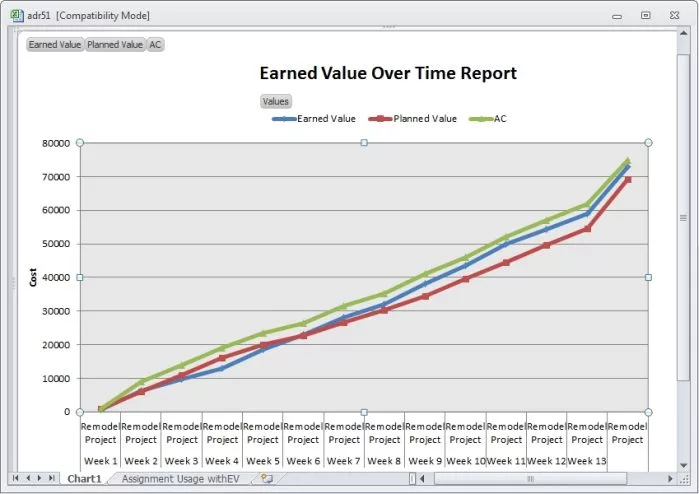
Because planned value, earned value, and actual cost are all measured as money, you can compare them to check schedule and cost performance. The Earned Value Over Time visual report, found in Project 2010, shown in the screenshot, presents all three measures over time.
Biafore figure 2
  • If earned value is less than planned value, less work is actually completed than you estimated, so the project is behind schedule.
  • If the earned value is greater than the actual cost, the work you've completed cost less than you estimated so the project is under budget.
Read more ยป

Labels:

Wednesday, October 06, 2010

Earned Value measurement using MS Project

  1. Create a project by listing the activities (WBS), enter durations, define dependencies along with appropriate leads and lags etc.
  2. Define resources with Standard Rate in Resource Sheet. Assign value $1 if resource costs are not to be shared
  3. Assign resources to each activities.
  4. Baseline the Project to get BAC i.e., baseline cost/Budget At complete/total project cost
  5. During tracking stage, as you update the progress values (update Actual Start, Actual Finish, Remaining work values instead of updating %complete value)
  6. In order to examine the EVM values, refer View --> Table --> More Tables --> Earned Value / Earned Value with Cost Indicators / Earned Value with Schedule Indicators tables by setting the Status Date (Project --> Project Information --> Status Date)

Labels: